Overview
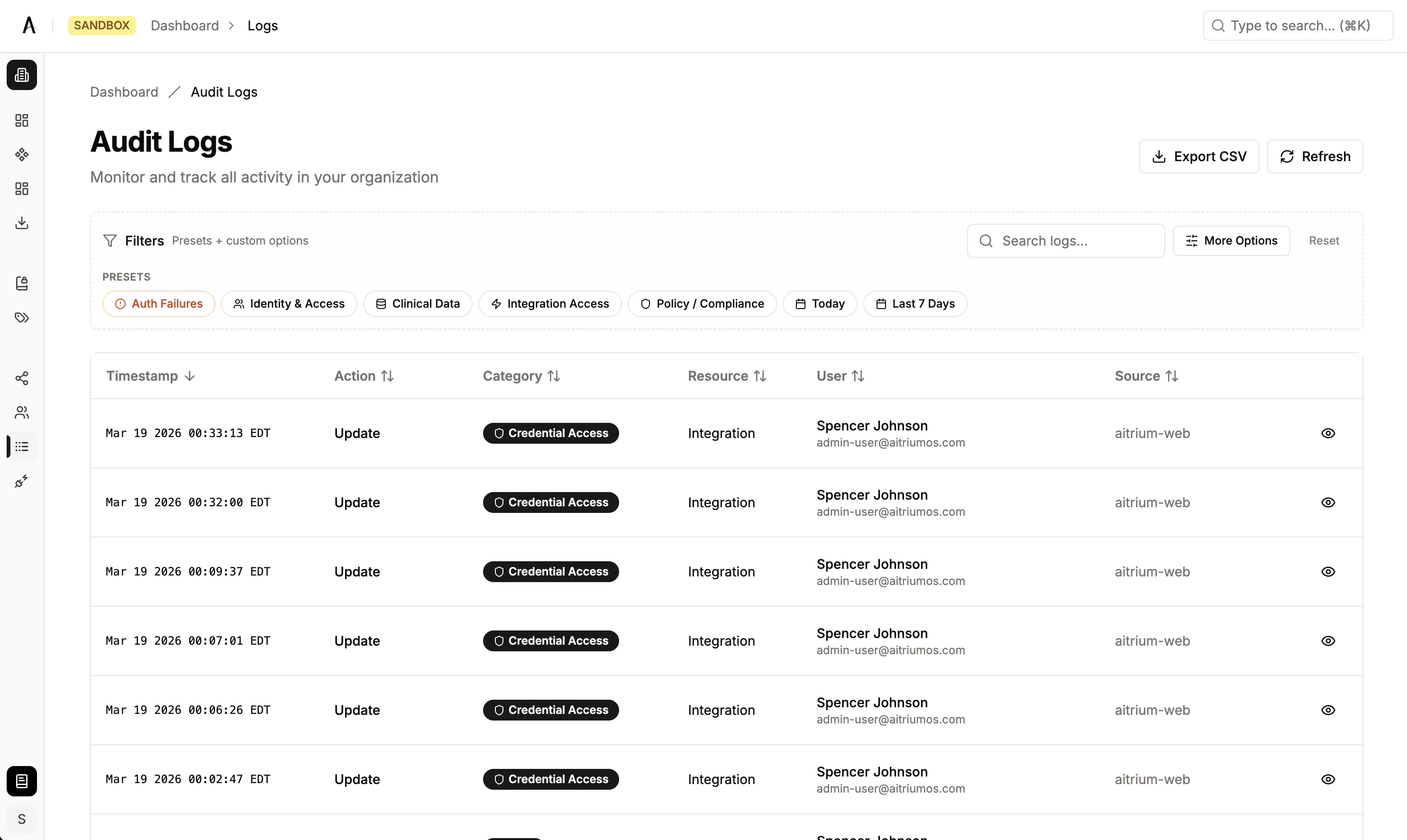
Audit Logging is accessed at Dashboard → Audit Logs. It provides a tamper-evident audit trail of all user actions and system events across your organization — from both the Aitrium Portal (web application) and AitriumOS Desktop (native application). Audit logs support:- Compliance reporting — Exportable records with reason-for-change tracking
- Security monitoring — Visibility into authentication events, access changes, and credential operations
- Operational traceability — End-to-end tracking of data workflows, submissions, and integration activity
Audit Log Table
The log table displays events in reverse chronological order (newest first):| Column | Description |
|---|---|
| Timestamp | When the event occurred, displayed in your local timezone |
| Action | Human-readable description of what was done |
| Category | Color-coded badge indicating the event domain (see Event Taxonomy) |
| Resource | Type of resource affected (e.g., User, Site, Integration) |
| User | Display name and email of the actor who performed the action |
| Source | Where the action originated (see Source Applications) |

Source Applications
Every audit event records where the action originated. The Source column shows one of two values:| Source | Application | Description |
|---|---|---|
| aitrium-web | Aitrium Portal | Actions performed in the web application — user management, project configuration, credential management, and authentication |
| aitrium-desktop | AitriumOS Desktop | Actions performed in the desktop application — clinical data tool execution, data transfers, QA submissions, and local credential management |
Event Taxonomy
Audit events are classified by category (the domain of the action) and action (the specific operation performed). The system enforces strict validation — each action is only valid within its designated category or categories.Categories and Actions
AUTH — Authentication
Authentication lifecycle events from both Portal and Desktop.
| Action | Description | Source |
|---|---|---|
LOGIN | Successful user login | Portal, Desktop |
LOGOUT | User logout or session end | Portal, Desktop |
LOGIN_FAILED | Failed login attempt | Portal, Desktop |
SSO_INITIATED | Single sign-on flow started | Portal, Desktop |
SSO_COMPLETED | SSO authentication completed successfully | Desktop |
SSO_FAILED | SSO authentication failed | Portal, Desktop |
PASSWORD_RESET_REQUEST | Password reset email requested | Portal, Desktop |
PASSWORD_RESET_COMPLETE | Password reset completed successfully | Portal |
PASSWORD_RESET_FAILED | Password reset attempt failed | Portal, Desktop |
EMAIL_VERIFICATION_SENT | Email verification link sent during registration | Portal |
EMAIL_VERIFICATION_COMPLETE | Email address verified | Portal |
IDENTITY_ACCESS — User & Access Management
User lifecycle and permission management events, primarily from the Portal.
| Action | Description | Source |
|---|---|---|
REGISTER | New user account created (via invitation or self-service) | Portal |
REGISTER_FAILED | User registration failed | Portal |
UPDATE_PROFILE | User profile updated (role, site, or status change) | Portal |
DEACTIVATE | User account deactivated | Portal |
REACTIVATE | Previously deactivated user account restored | Portal |
INVITATION_SENT | User invitation sent or refreshed | Portal |
INVITATION_FAILED | User invitation failed to send | Portal |
INVITATION_VERIFIED | Invitation link verified during registration | Portal |
INVITATION_VERIFICATION_FAILED | Invitation verification failed (expired or invalid) | Portal |
GRANT_ACCESS | Access granted to a user (role or site assignment) | Portal |
REVOKE_ACCESS | Access revoked from a user (invitation revoked or permission removed) | Portal |
CLINICAL_DATA — Clinical Data Operations
Clinical data access and processing events. Portal handles project/protocol-level actions; Desktop handles data tool execution.
| Action | Description | Source |
|---|---|---|
CREATE | Clinical resource created (e.g., project, dataset) | Portal |
READ | Clinical data accessed or viewed (e.g., DICOM dataset analysis) | Desktop |
UPDATE | Clinical resource updated | Portal |
DELETE | Clinical resource deleted | Portal |
EXPORT | Clinical data exported | Portal |
IMPORT | Clinical data imported | Portal |
PUBLISH | Protocol or clinical resource published | Portal |
UNPUBLISH | Protocol or clinical resource unpublished | Portal |
SHARE | Clinical data shared | Portal |
ARCHIVE | Clinical data archived | Portal |
RESTORE | Archived clinical data restored | Portal |
ANONYMIZE | DICOM data de-identified (severity: Critical) | Desktop |
VALIDATE | Data validated against policy or DICOM standards (severity: Medium) | Desktop |
TOKENIZE | Patient identifiers tokenized (severity: High) | Desktop |
REDACT | Sensitive data redacted from documents (severity: High) | Desktop |
SUBMISSION — Data Transfers & QA
Data transfer and quality assurance events from the Desktop application’s contribution workflows.
| Action | Description | Source |
|---|---|---|
QA_SUBMIT | QA metrics submitted for a contribution | Desktop |
QA_EVALUATE | QA evaluation triggered against a policy | Desktop |
TRANSFER_COMPLETE | Data transfer workflow completed successfully | Desktop |
TRANSFER_FAILED | Data transfer workflow failed | Desktop |
DATA_TRANSFER_COMPLETED | Integration-level data transfer completed (e.g., SFTP upload) | Desktop |
DATA_TRANSFER_FAILED | Integration-level data transfer failed | Desktop |
INTEGRATION — Integration Operations
Integration synchronization and execution events.
| Action | Description | Source |
|---|---|---|
API_CALL | External API call made | Portal |
WEBHOOK_TRIGGERED | Webhook event triggered | Portal |
SYNC_COMPLETED | Integration sync completed (e.g., platform contribution sync) | Desktop |
CREDENTIAL — Credential Management
Credential and integration access management from both Portal and Desktop.
| Action | Description | Source |
|---|---|---|
ACCESS | Credential accessed | Portal |
CREATE | Credential group created, or users added to credential group | Portal |
UPDATE | Credentials updated (SFTP config, connection status, etc.) | Portal, Desktop |
DELETE | Credential group deleted, or user removed from credential group | Portal, Desktop |
ROTATE | Credentials rotated | Portal |
TEST_CONNECTION | Integration connection test performed | Desktop |
POLICY_COMPLIANCE — Policy & Compliance
Policy management and compliance-related events.
| Action | Description | Source |
|---|---|---|
UPDATE_CHECK | Policy update check performed | Portal |
DOWNLOAD | Policy downloaded to Desktop for local evaluation | Desktop |
VALIDATE | Policy validation performed | Portal |
EXPORT | Policy or compliance report exported | Portal |
CONFIGURATION — System Configuration
Configuration changes to system settings, sites, and integration infrastructure.
| Action | Description | Source |
|---|---|---|
CONFIG_UPDATE | System configuration changed | Portal |
SYSTEM_UPDATE | System-level update applied | Portal |
MAINTENANCE | Maintenance operation performed | Portal |
INTEGRATION_ENABLED | Integration enabled for organization | Portal |
INTEGRATION_DISABLED | Integration disabled for organization | Portal |
API_KEY_GENERATED | API key generated | Portal |
API_KEY_REVOKED | API key revoked | Portal |
WEBHOOK_CONFIGURED | Webhook endpoint configured | Portal |
UPDATE | Configuration resource updated (e.g., site external ID, label mapping) | Portal, Desktop |
SYSTEM — System Events
System-level events and application lifecycle.
| Action | Description | Source |
|---|---|---|
DOWNLOAD_APPLICATION | AitriumOS Desktop application downloaded | Portal |
HEALTH_CHECK | System health check performed | Portal |
Resource Types
Each audit event references the type of resource affected:| Resource Type | Description |
|---|---|
| User | User accounts and profiles |
| Site | Research sites |
| Project | Clinical research projects |
| Protocol | Clinical protocols |
| Integration | External system integrations |
| Credential Group | Integration credential groups |
| Data Policy | Data compliance policies |
| Role | User role assignments |
| Organization | Organization records |
| Site Contribution | Data submissions to a project from a site |
| Data Tool Run | Execution of a clinical data tool (Desktop) |
| Document | Files and documents |
| Audit Log | Audit log export records |
Filtering Audit Logs
Filter Presets
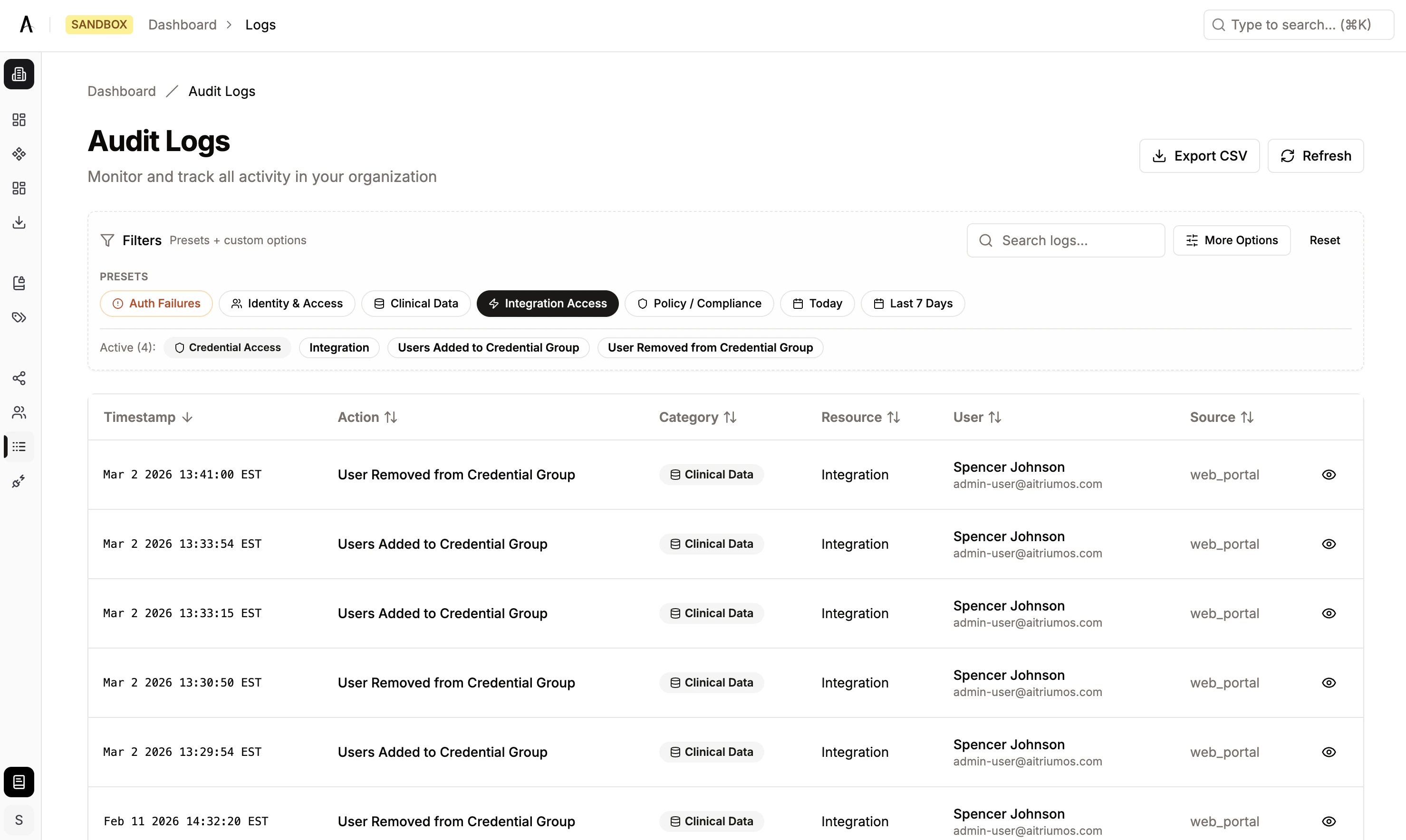
Quick-access presets surface common views with one click:| Preset | What It Shows |
|---|---|
| Auth Failures | Failed login and SSO attempts (LOGIN_FAILED, SSO_FAILED) |
| Identity Access | User management and permission changes (all IDENTITY_ACCESS events) |
| Clinical Data | Data access and modification events (all CLINICAL_DATA events) |
| Integration Access | Integration execution and credential events (INTEGRATION and CREDENTIAL categories) |
| Policy Compliance | Policy-related actions (all POLICY_COMPLIANCE events) |

Quick Date Filters
- Today — Events from the current day
- Last 7 Days — Events from the past week
Advanced Filters
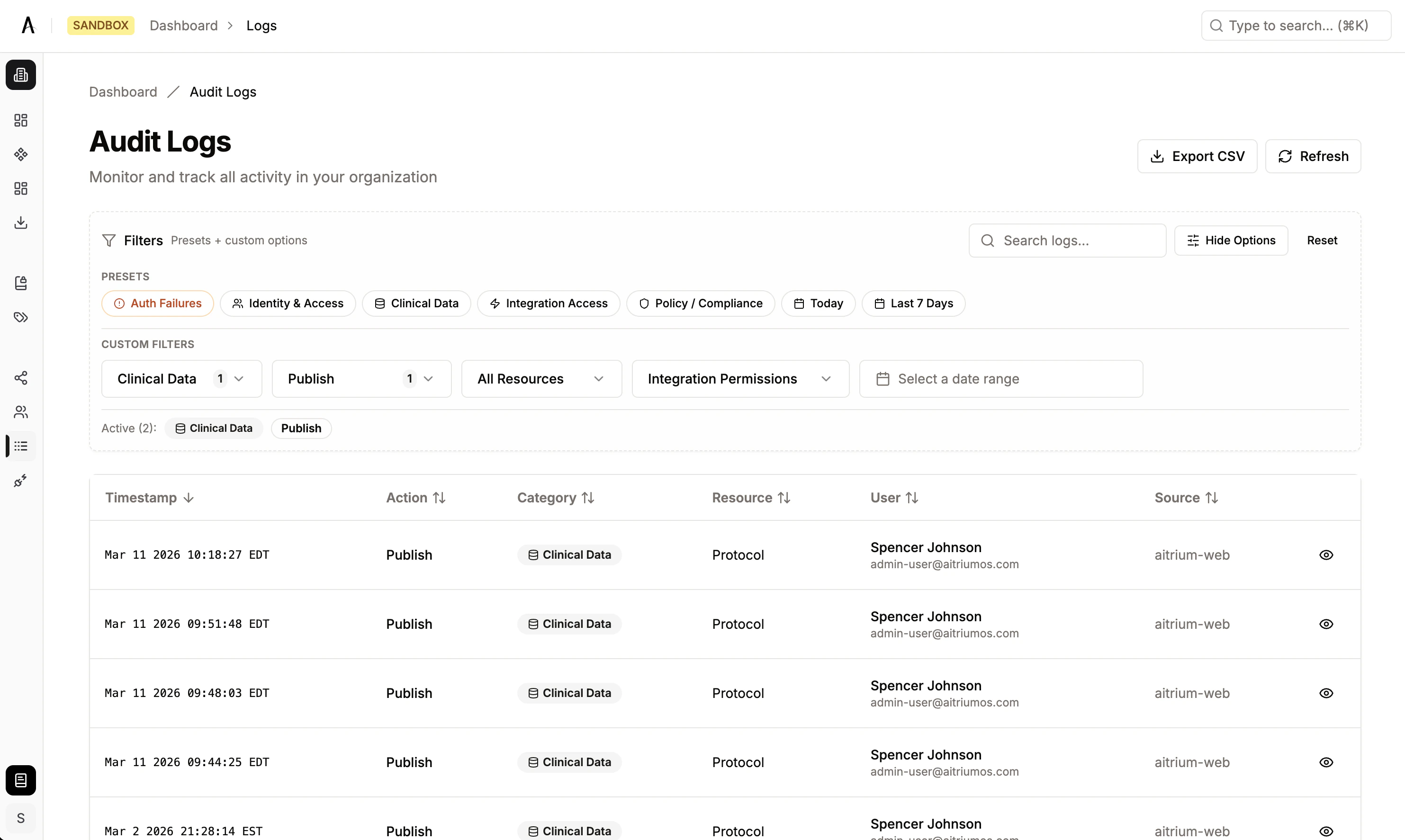
Click More Options to access the full set of filters:| Filter | Description |
|---|---|
| Action Categories | Multi-select from the 9 event categories |
| Event Types | Filter by specific actions (e.g., LOGIN_FAILED, INVITATION_SENT, ANONYMIZE) |
| Resource Types | Filter by affected resource type |
| Integration Operations | Filter by specific integration operation names |
| Date Range | Custom from/to date picker |
| Search | Full-text search across action, category, resource, email, and event details |

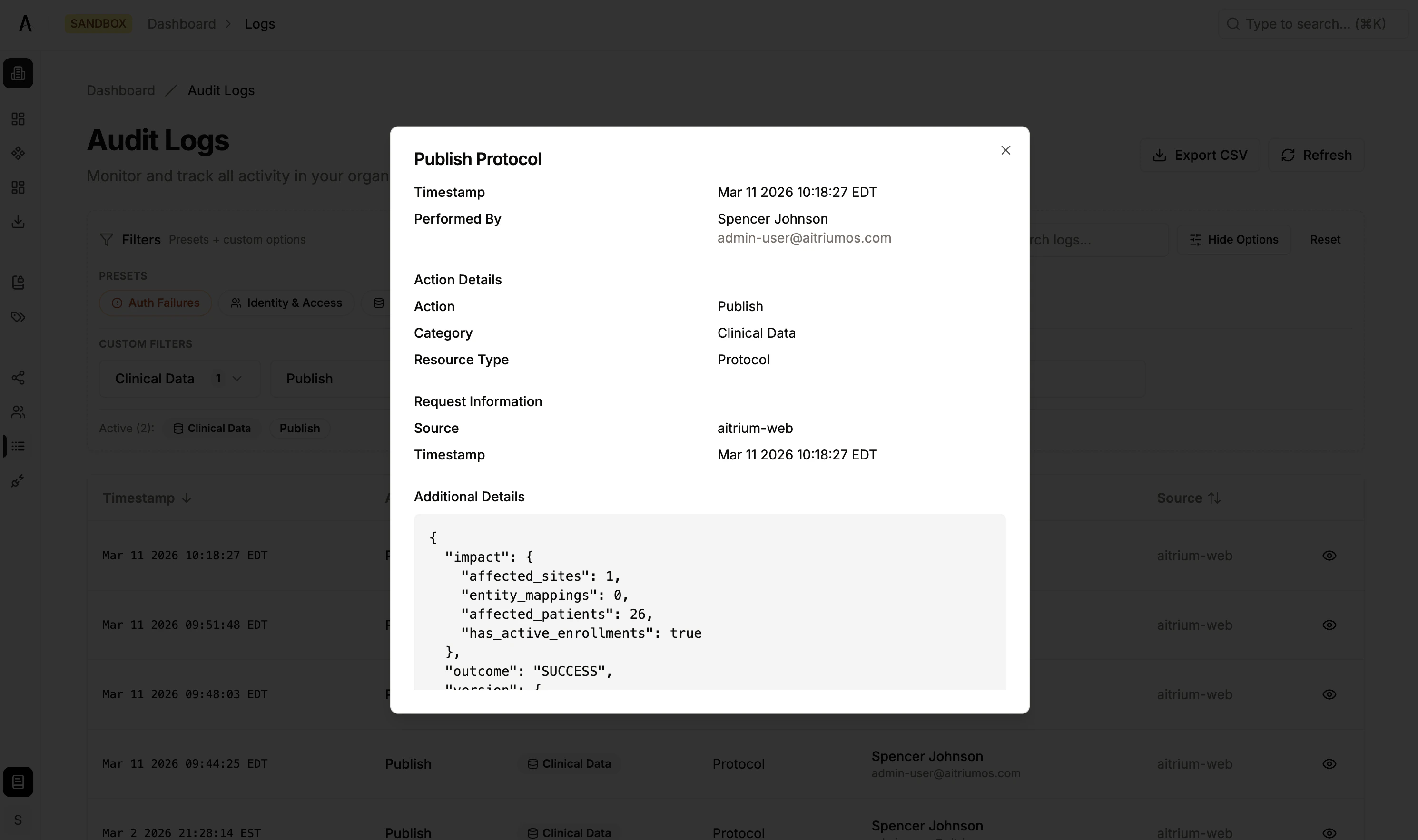
Viewing Log Details
Click View Details on any row to open the detail dialog, which displays:- Actor — Who performed the action (display name and email)
- Action Details — Structured grid of event properties as label/value pairs
- Request Information — Source application, timestamp, and request context
- Additional Metadata — Full event context in JSON format (scrollable for large entries)
Exporting Audit Logs
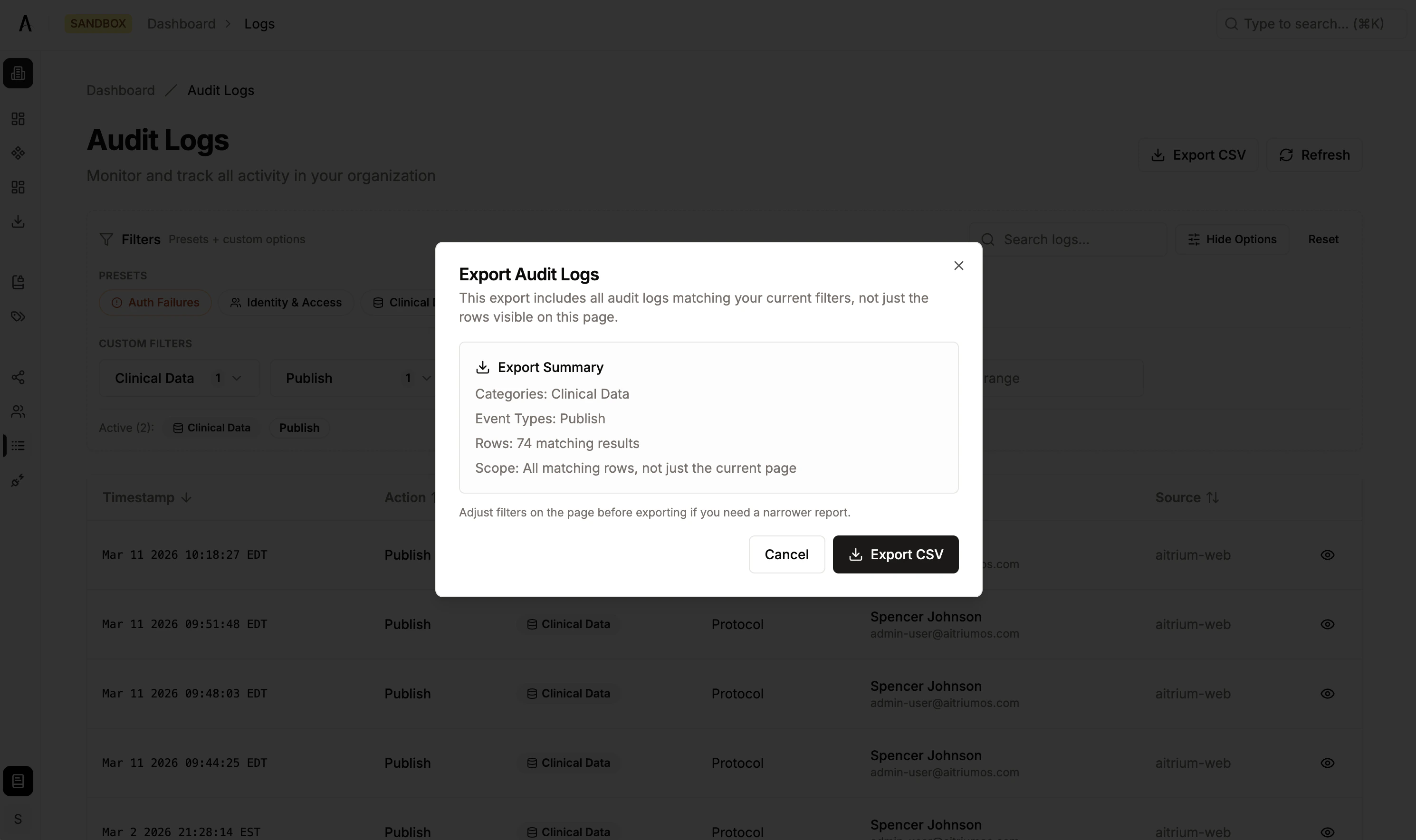
Export filtered audit logs as a CSV file for compliance reporting or offline analysis.- Apply your desired filters (presets, date range, or advanced filters)
- Click Export
- Review the export dialog, which shows:
- Total rows that will be exported
- Active filters applied to the export
- Confirm to download the CSV file
Export Details
| Property | Value |
|---|---|
| Format | CSV |
| File name | audit-logs-export-{timestamp}.csv |
| Row limit | 50,000 rows per export |
| Included columns | Event time (UTC), recorded time (UTC), actor email and display name, action, category, outcome, target resource type and display name, target user (if applicable), source app, authentication method, reason for change, change reference, details summary |
| Excluded data | IP addresses, authentication tokens, raw internal IDs, API keys, passwords, and other sensitive fields are automatically excluded |
If your filtered results exceed 50,000 rows, narrow your filters (e.g., reduce the date range or add category filters) and export in batches.